Everything you want to know.
Questions about privacy, how the app works, guardian alerts, battery life, and more — answered plainly, with separate sections for Android and iPhone.
Jump to: On Android · On iPhone
Does Agent Hita read my messages?
Yes — but only in memory, only during analysis, and it never stores or transmits the text. On Android, Agent Hita reads what's visible on screen in order to analyse it; on iPhone, it checks what's typed in the Agent Hita keyboard. The moment analysis is complete, the raw text is discarded. It is never written to storage and never sent anywhere. At most, the app keeps the result — a risk category and a severity level (and, on Android, the app name) — not the messages themselves.
What does the guardian actually receive?
A guardian email contains only:
- The risk category (e.g. "Grooming" or "Financial Scam")
- The severity level (HIGH)
- The app where the risk was detected (e.g. "WhatsApp" on Android; on iPhone it shows as "iOS Keyboard")
- A recommended action checklist tailored to that category
The email also shows when it was detected and, if one was entered during setup, the name of the person being protected. It never contains message text, the names or phone numbers of the people they were talking to, or conversation history.
Does Agent Hita send data to the cloud?
No message content is ever sent to the cloud. The only data that leaves the device is:
- Device registration and a daily activity signal — a random device identifier, the platform, and the date
- A guardian alert (HIGH risk only) — the risk category and severity, when it was detected, the app name, the device's country and time zone, and the protected person's name if one was entered
- On Android, anonymous performance and usage statistics; on iPhone, crash and hang reports that contain only the type of problem and the app version
- Feedback you choose to submit through the in-app feedback screen
All detection and AI analysis happens locally, on your device.
Is the source code public? Can I verify what the app does?
Yes. Agent Hita's source code is publicly available on GitHub. Anyone — researchers, journalists, parents, or security experts — can read the code and verify that it does exactly what we say. There are no hidden data collection paths, no backdoors, and no obfuscated network calls. View the source code →
The app is free for individual use. Commercial use requires a license.
What does Agent Hita detect?
Eight categories of harmful behaviour:
- Grooming — trust-building that escalates toward isolation, secrecy, and exploitation
- Sextortion — threats to share intimate images unless demands are met
- Romance scams — fabricated relationships designed to extract money
- Financial scams — urgent requests for gift cards, wire transfers, or cryptocurrency
- Identity phishing — attempts to steal passwords, verification codes, or personal documents
- Luring — fake job, modelling, or money-making offers to arrange real-world meetings
- Harassment & threats — repeated intimidation, blackmail, and targeted distress campaigns
- Disappearing messages — detection of ephemeral message activation to hide conversation history (Android only)
What are risk levels — LOW, MEDIUM, HIGH?
LOW: Weak signals detected.
MEDIUM: Moderate signals detected. Nothing is ever sent to the guardian at this level.
HIGH: Strong signals corroborated across multiple detection layers. A guardian alert email is sent (if a guardian is configured and has confirmed).
Thresholds are automatically lower for children and teenagers, so the same message triggers a higher risk level for a younger person. What you see on the device at each level differs by platform — see the Android and iPhone sections below.
How does Agent Hita handle teenagers who use slang and hyperbolic language?
This is a real challenge. Teenagers frequently use words like "kill," "destroy," "attack," and "I'll end you" in gaming and social contexts. Agent Hita addresses this in several ways:
- Word-level scores for harassment are dampened by 60% for adolescent and child user categories, so casual hyperbole doesn't accumulate past a threshold without a phrase-level signal
- The on-device AI model (Gemma on Android, Apple's on-device model on iPhone) is given an age-specific hint when analysing adolescent conversations, explicitly noting that hyperbolic gaming/social language is developmentally normal
- Detections require multi-layer corroboration — a word alone cannot produce a MEDIUM alert without at least some phrase-level support
What is a false positive and how do I report one?
A false positive is when Agent Hita flags a message as risky when it shouldn't have — for example, teenagers using hyperbolic slang like "I'll kill you at this game." These are expected in any detection system.
You can report a false positive from within the app — on Android from the event detail screen, on iPhone through the in-app feedback screen. This helps improve the detection models. On Android, false positive reports contain only the risk category and severity — never the message text itself.
Does the monitored person know the app is active?
Yes. Agent Hita is not a hidden surveillance tool. The app requires explicit setup by the person on the device, including accepting the terms, choosing a user category, and optionally configuring a guardian. It cannot be switched on without the device owner's direct action — on Android through the Accessibility Service permission in the device settings, and on iPhone by adding the keyboard and turning on “Allow Full Access” in Settings. Agent Hita is designed to be consensual. The person being protected is always aware the app is installed.
Who gives consent when a parent installs Agent Hita for a child?
The parent or legal guardian who installs and sets up Agent Hita on the child's behalf gives consent for the child: the first time the app opens, they are asked to confirm that they are the child's parent or legal guardian and to accept the Terms and Privacy Policy. Agent Hita can't be installed silently: the device owner has to add it and switch it on, and the child is not asked to create an account. Parents can ask us to review or delete their child's information, or refuse further collection, by contacting privacy@agenthita.org.
The information used to set up guardian alerts is provided by the parent or legal guardian, not requested directly from the child.
How often are guardian alerts sent?
Guardian alerts are only sent for HIGH-risk detections, and only to a guardian address that has been confirmed.
On Android, alerts are throttled to a maximum of one alert per contact per 24 hours. If multiple HIGH-risk events occur for the same contact within that window, they are accumulated and sent as a single aggregated alert when the window expires. This prevents alert fatigue while ensuring the guardian is informed.
On iPhone, each HIGH-risk detection sends its alert right away instead of being combined, and a daily limit per guardian address prevents floods.
Which apps does Agent Hita monitor?
Currently supported: WhatsApp, WhatsApp Business, Instagram Direct, Google Messages, Samsung Messages, and the standard Android SMS app. Only 1-on-1 conversations are analysed — group chats are intentionally skipped.
Additional apps can be added via remote configuration without requiring a new app update.
Does it work on encrypted apps like WhatsApp?
Yes. Agent Hita reads what's visible on screen — the same way a screen reader does — rather than intercepting the network. End-to-end encryption doesn't affect what's displayed on the device screen, so it works fully on WhatsApp, Instagram DM, and any other encrypted messaging app.
What is the on-device AI / Gemma model?
Agent Hita uses Gemma — a compact AI language model by Google — to provide deeper semantic understanding of messages. It runs entirely on the device, requires no internet connection once installed, and message content is never sent to any server.
The first time you open the dashboard, Agent Hita offers to set up Gemma. After you accept Google's Gemma terms, the app downloads and installs the model (~900 MB) automatically in the background — no manual steps needed.
If you decline, Agent Hita still runs its full rule-based detection pipeline, which covers thousands of known harmful phrases and word patterns. Gemma enhances detection — especially for coded or indirect language — but is not required for the app to work.
What do the risk levels do on Android?
LOW: Weak signals detected. Stored locally for pattern tracking. No notification sent.
MEDIUM: Moderate signals. Recorded and shown on the dashboard. Whether a local notification appears on the device depends on the notification preference below — nothing is ever sent to the guardian at this level.
HIGH: Strong signals corroborated across multiple detection layers. A local notification always fires and a guardian alert email is sent (if a guardian is configured).
Thresholds are automatically lower for children and teenagers, so the same message triggers a higher risk level for a younger person.
Can I control which risk levels send a notification?
Yes. Under Notification Settings in the app menu, there is a toggle for "Notify for high-risk only." HIGH-risk detections always produce a notification regardless of this setting — the toggle only decides whether MEDIUM-risk detections also interrupt you with a notification, or are recorded silently for the dashboard instead.
Default by account type:
- Self-protecting adult: ON by default — only HIGH-risk messages notify. MEDIUM-risk activity is still logged and visible on the dashboard.
- Vulnerable adult, adolescent, and child accounts: OFF by default — both MEDIUM and HIGH-risk messages notify, so a guardian or the monitored person sees moderate-risk activity as it happens rather than only in a later dashboard review.
This is only a starting default. Anyone can switch the toggle on or off at any time, for any account type, in Notification Settings.
What is the anti-coercion feature?
Before analysing any message, Agent Hita checks whether the monitored person is searching for help or trying to understand their monitoring situation — phrases like "am I being tracked," "I feel unsafe," or "domestic abuse help." If detected, three things happen automatically:
- Analysis stops — the message is not analysed
- Crisis resources and helpline numbers appear privately on the device
- No notification is sent to the guardian
This moment is never recorded anywhere. It is designed to protect the monitored person from situations where the monitoring itself has become a tool of control. Read the full Trust Specification →
Does Agent Hita drain the battery?
Agent Hita is event-driven — it only runs when a messaging app is in the foreground and a new message appears. It does not run in the background continuously or poll for changes. Rule-based detection runs in milliseconds. Gemma inference takes a second or two per message but is only triggered when a new message appears on screen.
In typical use the battery impact is minimal. Some Android manufacturers (notably Samsung) aggressively kill background services. Agent Hita addresses this by running as a foreground service with a persistent notification, which also gives you visibility that it is active.
What Android version is required?
Android 8.0 (API level 26) or higher is required. The Gemma on-device AI model requires a device with at least 4 GB of RAM and works best on devices with 6 GB or more. The app runs fully without Gemma on any supported Android device.
How do I set up Agent Hita on iPhone?
Install Agent Hita from the App Store, then open the app once to choose an age band and add a guardian email — the guardian confirms the address from the email we send.
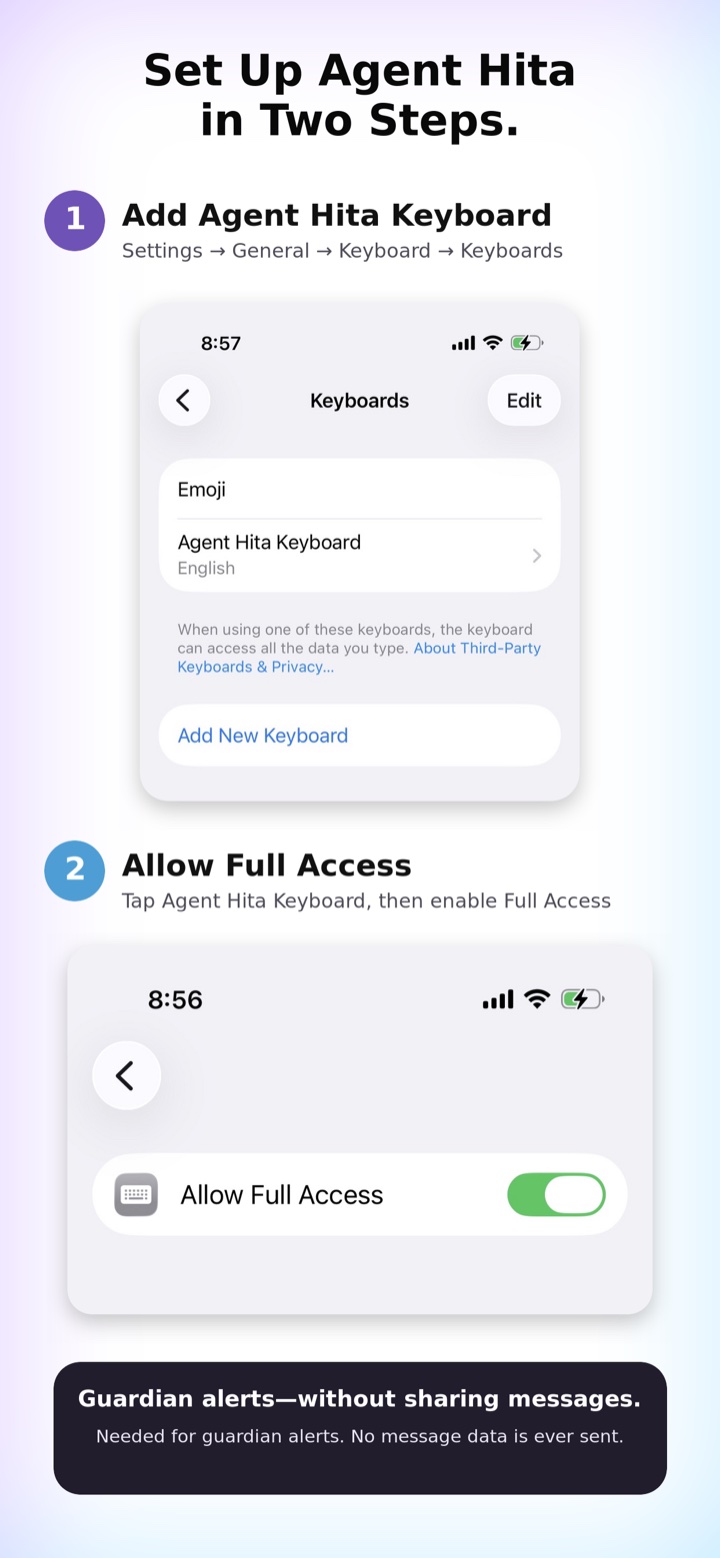
Then set up the keyboard in two steps:
- Add the keyboard. Open Settings → General → Keyboard → Keyboards → Add New Keyboard, then choose Agent Hita Keyboard.
- Allow Full Access. Tap Agent Hita Keyboard in that list and turn on Allow Full Access. It's needed for guardian alerts, and no message data is ever sent.
In any app, press and hold the globe key on your keyboard and choose Agent Hita to start typing with protection on.
How does Agent Hita work on iPhone?
iOS doesn't let one app read another app's screen, so on iPhone Agent Hita works differently: it's a keyboard. As you or your child type in any app, it checks the reply on the device and shows a warning in the keyboard when something looks unsafe. HIGH-risk detections also email a guardian.
Because it only sees what is typed, it does not see incoming messages, and it protects only while the Agent Hita keyboard is the one being used.
What does it look for in what's typed?
Most of the same categories as on Android, recognized in the reply being typed — for example agreeing to keep a secret from parents, handing over a code or password, agreeing to pay under pressure, agreeing to meet up or saying no one is home, or pleading with someone who is making threats.
Which apps does it work in?
Any app where you type with the Agent Hita keyboard. iOS doesn't allow custom keyboards in secure fields such as password fields, and some apps refuse third-party keyboards. Agent Hita also skips fields an app labels as a specific type of data, such as an email address or a one-time code. Text typed with another keyboard isn't analyzed.
Does it work on encrypted apps like WhatsApp?
Yes. It checks what you type, on your device, not messages on a server, so it works the same way in any app you use the Agent Hita keyboard in, encrypted or not.
Why does the keyboard ask for Full Access?
iOS shows a standard warning for any keyboard with “Allow Full Access”: that it could transmit what you type. Agent Hita uses Full Access only to send the guardian alert email when it detects a HIGH-risk message. The alert contains the risk category, severity, and when it happened — never what was typed — and your typing is not sent to our servers. Without Full Access, guardian alerts can't be sent.
What AI does it use on iPhone?
Agent Hita doesn't download a model on iPhone. On supported iPhones and iOS versions it may use an Apple-provided on-device AI model; when that model isn't available, it uses its rule-based detection alone. Message content is never sent to a server either way.
What do the warnings look like on iPhone?
LOW and MEDIUM show as a warning in the keyboard's top bar, and HIGH also emails your guardian (if one is set up and confirmed). There is no dashboard, no separate notification, and no notification setting on iPhone: the keyboard shows its own warning whenever it detects something.
Does it drain the battery on iPhone?
There is no background service on iPhone: the keyboard only runs while you are typing with it.
What iPhone version is required?
iOS 26 or later. Apple's on-device AI needs an iPhone that supports Apple Intelligence; on other iPhones, rule-based detection still runs.
Are all Android features available on iPhone?
Not currently. These are Android-only for now: disappearing-message detection, the anti-coercion safeguard (crisis resources and helplines), the 90-day consent check-in, the email to the guardian when monitoring is turned off, and the dashboard and notification settings.